A common way to reason about agent isolation is one runtime per user: separate process, filesystem, and memory. That is simple, but not always necessary.
For some use cases, a single Deep Agent process can serve multiple users, provided memory, checkpoints, and tool access are scoped correctly. In this post I’ll walk through a standalone TypeScript example using LangGraph Deep Agents and Postgres, where each user gets separated memory while sharing the same agent process and read-only global skills.
The framework also supports many storage backends for the agent filesystem, including Postgres. Postgres gives the agent durability — if the container crashes, the agent can pick up the conversation where it left off. Under the hood the agent still thinks it’s reading and writing files; those files just happen to live in Postgres rows, namespaced by user. This post walks through how to set this up.
The full working code for everything below is on GitHub at hughlivingstone/Deep Agents-multi-tenant-example.
This is a standalone toy implementation built from public Deep Agents/LangGraph APIs. It does not describe my employer’s systems, code, architecture, roadmap, or internal discussions.
What you’ll build
A single Deep Agent that:
- Stores its checkpoints (conversation state) in Postgres
- Exposes a virtual filesystem to the LLM via the Deep Agent’s
read/write/lstools - Mounts
/skills/as a read-only, globally shared directory - Mounts
/memories/as a per-user directory, scoped by auserIdpassed in at invocation time
Security note: this demo passes
userIdat invocation time to show how the storage scoping works. In a real app, that value must come from trusted auth context, such as a verified access token, not from the request body. Namespace separation is only one part of tenant isolation.
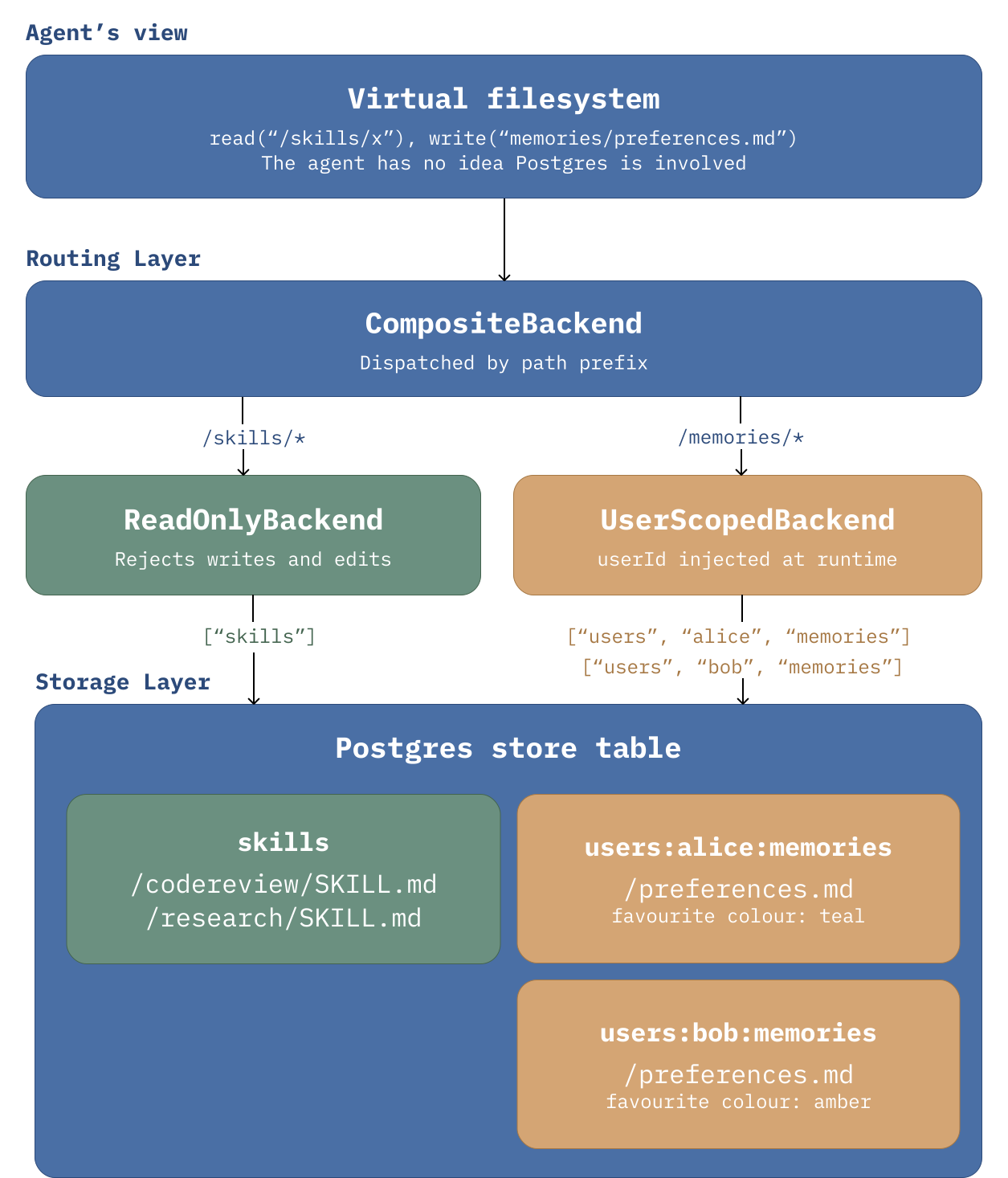
Deep Agent Architecture
Step 1 — Set up the Postgres persistence
The Deep Agent needs a store for the persistent user memories and skills that are used across conversations. It also uses a checkpointer store for its conversation state to deduce what it should do next. Both stores can live in the same Postgres database. (src/db.ts)
import { PostgresSaver } from "@langchain/langgraph-checkpoint-postgres";
import { PostgresStore } from "@langchain/langgraph-checkpoint-postgres/store";
import pg from "pg";

const { Pool } = pg;

export interface Persistence {
  pool: pg.Pool;
  store: PostgresStore;
  checkpointer: PostgresSaver;
}

export async function createPersistence(databaseUrl: string): Promise<Persistence> {
  const pool = new Pool({ connectionString: databaseUrl });
  const store = PostgresStore.fromConnString(databaseUrl);
  await store.setup();

  const checkpointer = PostgresSaver.fromConnString(databaseUrl);
  await checkpointer.setup();

  return { pool, store, checkpointer };
}
The important thing to remember is that the storage implementation is abstracted away from the agent. The LLM never knows it’s talking to Postgres — it just sees a filesystem and uses the built-in read, write, and ls tools to navigate it.
Step 2 — Compose backends for skills and memory
When creating the agent, the function takes a backend parameter. This is where multi-tenancy actually happens. Deep Agents lets you mount different backends at different path prefixes, the same way you’d mount different filesystems on a Linux box. You could have /memories/ hit a Postgres database and /scratch/ use an S3 bucket — they’re independent.
For our setup, we want:
/skills/— global, shared across all users using Postgres, read-only so a user’s conversation can’t accidentally rewrite the agent’s skill set/memories/— per-user using Postgres, scoped byuserIdso user A’s notes are separated from user B’s notes
A read-only backend
The Python SDK has a built-in permissions system but it hasn’t been ported to TypeScript yet. We can fill the gap with the decorator pattern — wrapping the underlying backend in a class that passes reads through but rejects writes and edits. (src/readOnlyBackend.ts)
export class ReadOnlyBackend implements BackendProtocolV2 {
  constructor(
    private readonly backend: BackendProtocolV2,
    private readonly label: string,
  ) {}

  read(filePath: string, offset?: number, limit?: number): Promise<ReadResult> {
    return Promise.resolve(this.backend.read(filePath, offset, limit));
  }

  write(filePath: string, _content: string): WriteResult {
    return {
      error: `${this.label} is read-only. Write denied for ${filePath}.`,
      filesUpdate: null,
    };
  }

  edit(
    filePath: string,
    _oldString: string,
    _newString: string,
    _replaceAll?: boolean,
  ): EditResult {
    return {
      error: `${this.label} is read-only. Edit denied for ${filePath}.`,
      filesUpdate: null,
    };
  }

  uploadFiles(files: Array<[string, Uint8Array]>): FileUploadResponse[] {
    return files.map(([path]) => ({
      path,
      error: "permission_denied",
    }));
  }
}
Reads pass through. Writes, edits, and uploads come back with a permission error that the agent will see. The agent doesn’t crash — it just gets told no, and figures out what to do next.
A user-scoped backend
This is the bit that separates memories by user. We extend StoreBackend and override how it builds the namespace key. (src/userScopedBackend.ts)
export class UserScopedBackend extends StoreBackend {
  constructor(
    private readonly suffix: string[],
    options?: StoreBackendOptions,
  ) {
    super(options);
  }

  protected getNamespace(): string[] {
    const userId = getConfig().configurable?.userId;
    if (typeof userId !== "string" || userId.length === 0) {
      throw new Error("UserScopedBackend requires configurable.userId");
    }
    return ["users", userId, ...this.suffix];
  }
}
The getConfig().configurable?.userId pulls the userId from the runtime config that you pass in when you invoke the agent. Every read and write through this backend gets prefixed with users/<userId>/, so two users hitting the same agent will end up in different Postgres rows under different namespaces.
Namespace separation is not a substitute for authz checks around who can invoke which userId. The demo keeps auth out of scope so the storage pattern is easier to see.
If you forget to pass a userId, we throw and the agent fails loudly.
In the next Deep Agents release this can be replaced with a namespace factory, which is a cleaner API for the same pattern.
Step 3 — Wire it into createDeepAgent
Now we hand the custom backends to Deep Agents along with the Postgres store and checkpointer. (src/agent.ts)
const SYSTEM_PROMPT = `Save user-specific notes to /memories/preferences.md so they persist across conversations.`;

let agent: Agent | null = null;

export function initAgent(
  model: BaseChatModel,
  store: PostgresStore,
  checkpointer: PostgresSaver,
): Agent {
  if (agent) return agent;
  agent = createDeepAgent({
    name: "multi-tenant",
    model,
    store,
    checkpointer,
    systemPrompt: SYSTEM_PROMPT,
    memory: ["/memories/preferences.md"],
    skills: ["/skills/"],
    backend: new CompositeBackend(new StateBackend(), {
      "/memories/": new UserScopedBackend(["memories"]),
      "/skills/": new ReadOnlyBackend(
        new StoreBackend({ namespace: ["skills"] }),
        "Skills",
      ),
    }),
  });
  return agent;
}
We’ve set the memory file to /memories/preferences.md and listed it in the memory argument to createDeepAgent. The Deep Agents framework’s built-in system prompt instructs the agent to write user-specific notes to whichever files you list there, so you can name it whatever you like.
CompositeBackend is the class that lets us configure the path routing to the backends we created. It takes a default backend (StateBackend) and a map of path prefixes to specific backends. When the agent reads /memories/preferences.md, the composite routes that read to our UserScopedBackend, where getNamespace() injects the userId so the namespace becomes users:<userId>:memories. The actual Postgres row is keyed under that user’s namespace, separated from everyone else’s.
When it reads /skills/yourskill/SKILL.md, it goes to the read-only wrapper around the global skills store.
The agent itself has no idea any of this is happening. It just sees a filesystem and operates on it via its tools.
This is what it looks like when the agent writes to user memory in the Postgres store table. Note how the namespace_path is what we set in UserScopedBackend.getNamespace() — that’s what scopes the memory to a specific user.
namespace_path | users:demo-bob-1777847658649:memories
key            | /preferences.md
value          | {
                   "content": "- User's favourite colour is amber.\n",
                   "mimeType": "text/plain",
                   "created_at": "2026-05-03T22:34:24.062Z",
                   "modified_at": "2026-05-03T22:34:24.062Z"
                 }
created_at     | 2026-05-03 22:34:24.063085+00
updated_at     | 2026-05-03 22:34:24.063085+00
Step 4 — Invoke the agent
The invoke function lives in the same file as initAgent. (src/agent.ts)
export async function invokeAgent(
  userId: string,
  threadId: string,
  message: string,
): Promise<string> {
  if (!agent) throw new Error("Agent not initialised. Call initAgent() first.");
  const result = await agent.invoke(
    { messages: [{ role: "user", content: message }] },
    { configurable: { userId, thread_id: `${userId}:${threadId}` } },
  );

  const last = result.messages.at(-1);
  return typeof last?.content === "string" ? last.content : "";
}
The configurable object is how the userId gets all the way down to UserScopedBackend.getNamespace(). LangGraph threads it through the call stack for you. The thread_id is the conversation ID for the checkpointer, which is how the agent knows whether this is a new conversation or a continuation. Prefixing it with userId means that even if two users happen to use the same client-supplied threadId, they still end up on different checkpoint rows.
The function is wired into a small Express server (src/server.ts) that exposes a /chat endpoint, which is what the demo below hits.
Again: in a real app, the userId should not come from the user request. It should come from a trusted source such as a verified access token issued by an IdP.
Demo
Two users, Alice and Bob, send the same kind of message at roughly the same time. They both hit their own separated memories.
Alice then asks the agent to save a skill. The agent can’t, because /skills/ is mounted read-only, and it tells her so. In a real app, you’d probably mention this in the system prompt so the agent doesn’t waste a tool call trying to write there in the first place.
Demo script: scripts/run-agent-demo.ts.
Multi-tenant deepagent — per-user memory demo
────────────────────────────────────────────────────────────────
alice  →  demo-alice-1777762394746
bob    →  demo-bob-1777762394746

WRITE
────────────────────────────────────────────────────────────────
alice  ▸  Save a memory: my favourite colour is teal.
agent  ◂  Saved.
bob    ▸  Save a memory: my favourite colour is amber.
agent  ◂  Saved.

RECALL  (new thread → checkpointer state is empty)
────────────────────────────────────────────────────────────────
alice  ▸  What is my favourite colour? Just the colour name.
agent  ◂  teal
bob    ▸  What is my favourite colour? Just the colour name.
agent  ◂  amber

READ-ONLY  (agent tries to write under /skills/)
────────────────────────────────────────────────────────────────
alice  ▸  Save a new skill at /skills/test/SKILL.md.
agent  ◂  I can't write to `/skills` here because it's read-only.

          If you want, I can instead save it somewhere writable, like `/memories/` or another project directory you specify.

STORAGE  (postgres store table)
────────────────────────────────────────────────────────────────
users:demo-alice-1777762394746:memories/preferences.md
   └─ - User's favourite colour is teal.
users:demo-bob-1777762394746:memories/preferences.md
   └─ - User's favourite colour is amber.
The recall happens on a fresh thread, so the checkpointer state is empty — the only way the agent can answer the question is by reading from the per-user memory store. Each user gets their own answer, and the underlying Postgres rows are separated by namespace.
I tested the example with a couple of hosted models and a local Qwen model; the storage pattern is model-agnostic.
Gotcha: skills don’t currently scope per-user
If you want per-user skills as well as per-user memory, you cannot do it with this setup. The skills middleware caches the first set of loaded skills and short-circuits on every subsequent invocation:
function createSkillsMiddleware(options) {
  const { backend, sources } = options;
  let loadedSkills = [];
  return createMiddleware({
    name: "SkillsMiddleware",
    stateSchema: SkillsStateSchema,
    async beforeAgent(state) {
      if (loadedSkills.length > 0) return;
That loadedSkills array is closure-scoped to the middleware instance, which is shared across all invocations. So whichever user hits the agent first locks in their skills, and every other user gets those instead of their own. This is fine for the global-skills pattern in this post, but it breaks if you try to swap ReadOnlyBackend for UserScopedBackend on the /skills/ mount.
I don’t know whether this is intended behaviour, but it means per-user skills are unsafe with this setup.
Two ways to work around this currently:
- Create a fresh Deep Agent instance per user, and cache the instances so you don’t pay the creation cost on every request.
- Write your own skills middleware that doesn’t cache.
Wrapping up
Now we have a single Deep Agent process serving many users, with per-user memory separated by Postgres namespace and globally shared skills mounted read-only. The multi-tenancy lives in three small classes (CompositeBackend, ReadOnlyBackend, UserScopedBackend) and stays out of the agent’s prompt and tool calls.
Deep Agents makes plugging in different data stores simple: swap Postgres for S3 or Redis and the agent doesn’t notice, it just sees a virtual filesystem.